

What should I do if I have trouble logging in or renewing my password?
If you’re having trouble logging in or resetting your password, please try the following options:
Are your credentials valid?
Make sure your username/email and password are entered correctly (watch out for typos, caps lock, extra spaces, etc.). If you have multiple accounts, ensure you are using the correct one.
Do you remember your password?
If you can’t remember your password, request a reset link from the system:
- Click the “Forgot Password?” link on the login page
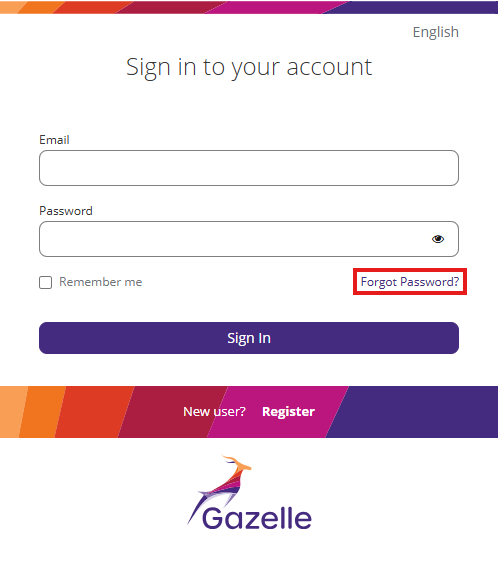
2. Enter your registered email address. You should receive a password reset link shortly.
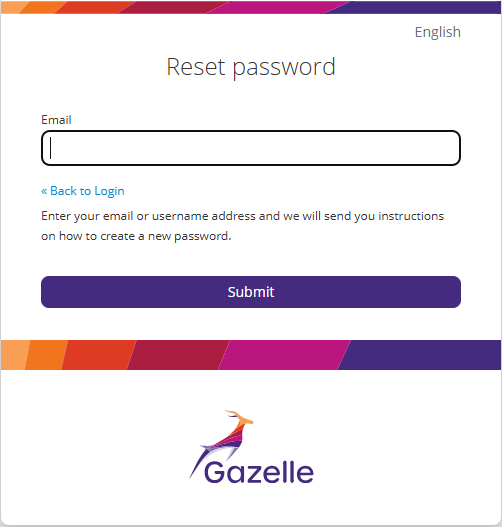
3. Check your email (including spam/junk folders)
If you don’t receive anything within a few minutes, try following the above steps again. Occasionally there may be a short delay in processing the reset request. If the system is under maintenance or heavy load, it might take longer.
Clear cache/cookies or try another browser
Sometimes, browser cookies become corrupted or outdated. Clear your browser’s cache and cookies, then retry. Alternatively, use a different browser or device to see if that solves the issue.
Is your account active?
Ensure your account is active. Your account might be locked, suspended, or awaiting activation. If so, you won’t be able to log in or reset your password until that is resolved.
As a first step, contact your organization’s Gazelle administrator.
Still not working?
If none of the above works, reach out to the designated Gazelle support contact (found via the Contact link in the website footer). Provide the relevant details to help them support your request efficiently: the URL of the Gazelle instance, the email address linked to your account, any error messages received, and the approximate time of your attempt.